
According to GitHub’s research, developers using AI coding assistants complete tasks 55% faster — and that gap compounds sprint after sprint.
This guide breaks down what AI-enabled engineering means in practice, where it delivers results across SDLC phases, and how to integrate it into your existing workflows without ripping everything out and starting over.
- AI creates compounding value across every SDLC phase rather than improving any single stage in isolation.
- Organizations already report an average 19% increase in productivity from AI in quality engineering alone, while elite DevOps teams using AI-enabled pipelines deploy 182 times more frequently than low performers.
- The distinction between AI-assisted, AI-enabled, and autonomous development matters operationally: most teams start with inline code suggestions, but meaningful ROI comes from embedding AI across multiple SDLC phases simultaneously.
- Successful AI-SDLC integration follows a deliberate sequence — process audit, targeted pilot, disciplined measurement — and the organizations widening the competitive gap are those who integrated incrementally and cut what didn’t hold up.
What Are AI-Enabled Engineering Services?
AI-enabled engineering services apply machine learning, large language models, and intelligent automation to software development. These services embed AI into existing workflows — from requirements gathering and comprehensive testing to functional and non-functional requirements validation and production monitoring — so developers spend less time on repetitive work and more time solving complex problems that need human judgment.
Identify bottlenecks in your development process, then deploy AI where it creates the highest leverage. That could mean auto-generating boilerplate code, predicting which tests are most likely to fail, or triaging production incidents before an engineer even opens a dashboard.
What separates AI-enabled engineering services from generic “AI tools” is the depth of integration:
- tools sit alongside your workflow, while
- AI-enabled engineering reshapes it.
AI-Assisted vs. AI-Enabled vs. Autonomous Development
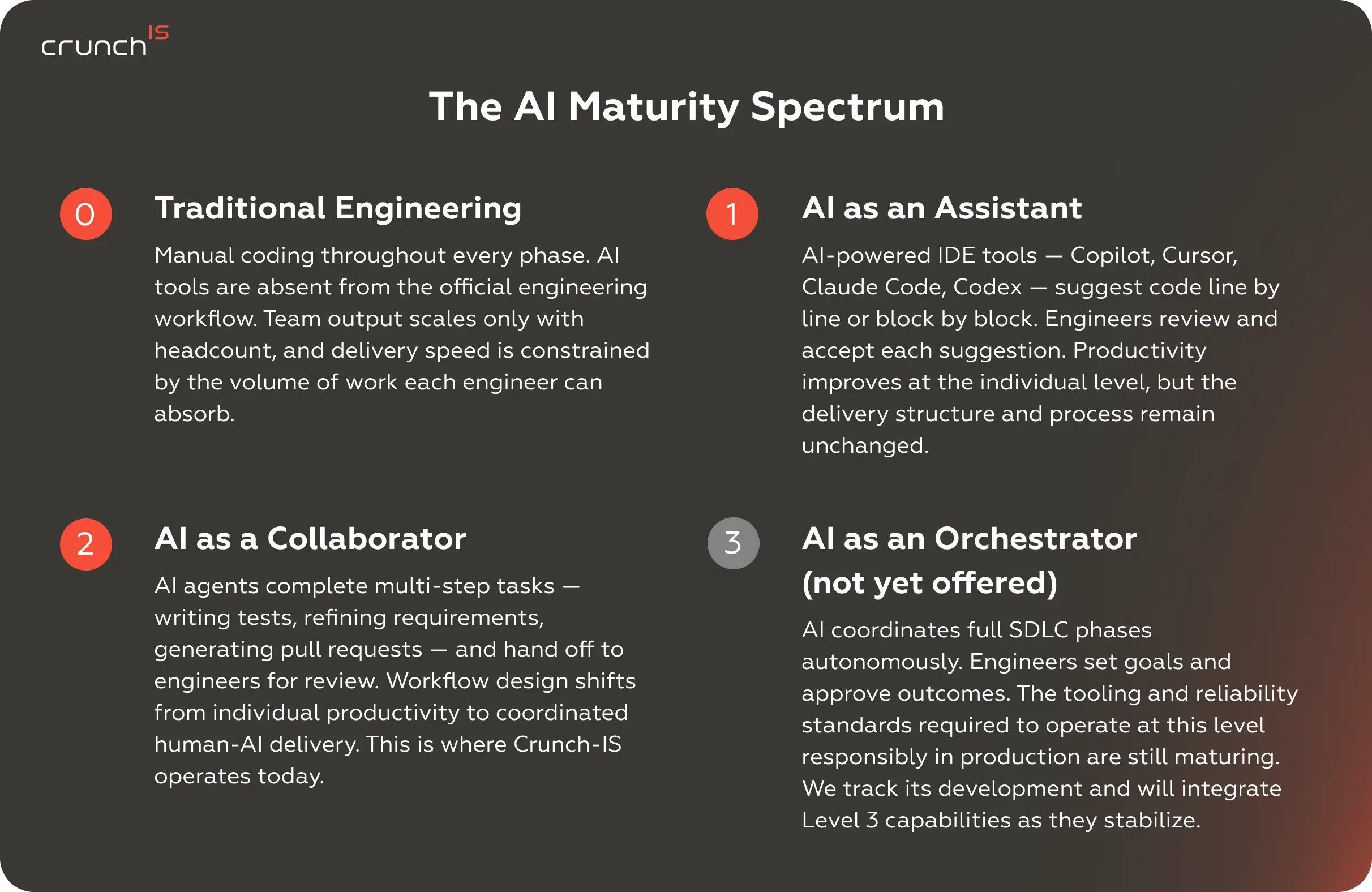
Not every organization needs — or is ready for — the same level of AI involvement. It helps to think in three tiers:
- AI-assisted development is where most teams start. Developers use AI tools for software development, like GitHub Copilot or Claude Code, as intelligent autocomplete — helpful suggestions that speed up coding but remain firmly under human control. The developer accepts, rejects, or modifies every output.
- AI-enabled development goes further. AI participates across multiple SDLC phases — generating test cases, reviewing pull requests, flagging architectural risks, and optimizing CI/CD pipelines. The developer still makes decisions, but AI handles a growing share of analytical and repetitive tasks. Gartner projects that by 2028, 90% of enterprise software engineers will use AI code assistants, up from under 14% in early 2024.
- Autonomous development is the emerging frontier. AI agents execute multi-step tasks — writing features from specifications, running tests, iterating on failures — with minimal human intervention. Today, this works best for well-defined, contained tasks. Full autonomous AI-SDLC remains aspirational, but the pieces are assembling fast.
Why Integrate AI into Your SDLC?
Key Benefits of AI-Driven Development
- Developer velocity is the most visible gain. Stack Overflow’s 2025 survey found that 52% of developers reported a positive impact on productivity from AI-assisted development. DX’s analysis of 135,000+ developers puts the average time saved at 3.6 hours per week — across a team of 50, that amounts to 180 engineering hours every week, roughly 4.5 full-time equivalents.
- Code quality improves, too. GitHub’s controlled studies show readability gains of 3.6%, reliability improvements of 2.9%, and stronger maintainability across AI-assisted codebases. These may look like modest percentages, but at scale, they translate into fewer production incidents and less rework.
- Then there’s the talent multiplier effect. Junior developers with AI assistance close the gap with mid-level engineers faster. Senior engineers offload routine work and focus on architecture and complex problem-solving. Your best people stay on your hardest problems.
Impact on Speed, Cost, and Quality
AI-driven software development produces measurable gains across multiple dimensions — though not uniformly. Code generation sees the largest acceleration. Testing and QA come next, particularly when AI handles test case generation and regression identification. Planning and requirements engineering show modest yet meaningful improvements.
For organizations moving from traditional delivery models to AI-enabled engineering systems, the cumulative effect is significant. According to Capgemini’s World Quality Report 2025, organizations already report an average 19% increase in productivity from AI integration in quality engineering alone.
Companies working with Crunch-IS ship up to 2x faster without proportional headcount growth — and at a lower cost than traditional delivery. Output quality rises alongside speed.
AI’s Role in Digital Transformation
Digital transformation initiatives fail more often than they succeed — and a common reason is that technology adoption outpaces the organization’s ability to absorb change. AI in SDLC offers a different path: instead of replacing systems wholesale, AI integrates into the development process itself, making every subsequent technology initiative faster and less risky.
When your SDLC is AI-enabled, new feature development accelerates, legacy modernization becomes more predictable, and your team builds the muscle memory for working alongside AI. That capability compounds with each subsequent initiative.
Key SDLC Phases Where AI Adds Value
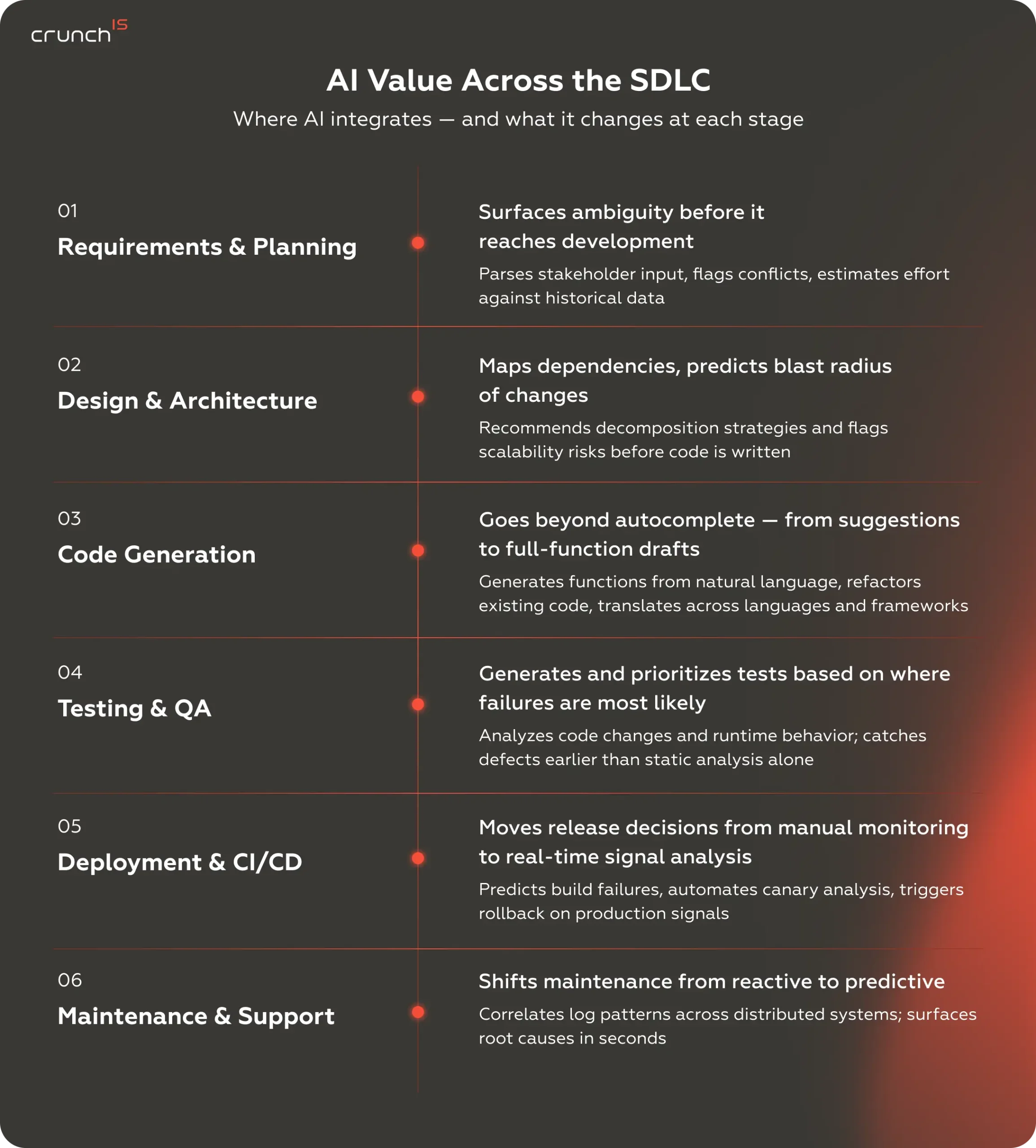
AI doesn’t improve the SDLC in one place. It compounds across every phase — each gain building on the last. The sections below map where AI creates the most leverage and what it actually does at each stage.
AI in Requirements Engineering and Planning
Requirements engineering is where ambiguity costs the most. Misunderstood requirements account for a disproportionate share of project overruns and failed launches. AI changes the equation by analyzing user feedback, support tickets, market data, and historical project data to surface patterns that humans miss in the noise.
Natural language processing models can parse stakeholder interviews, extract requirements, identify conflicts, and flag gaps. AI can also estimate effort and risk by comparing new requirements to historical project data, providing product managers and engineering leads with a more grounded basis for sprint planning.
AI in Software Design and Architecture
Architecture decisions have long-lasting consequences, and AI is now helping engineers make better ones. AI models can analyze existing codebases to recommend design patterns, identify potential scalability bottlenecks, and evaluate architectural trade-offs based on non-functional requirements like performance, security, and maintainability.
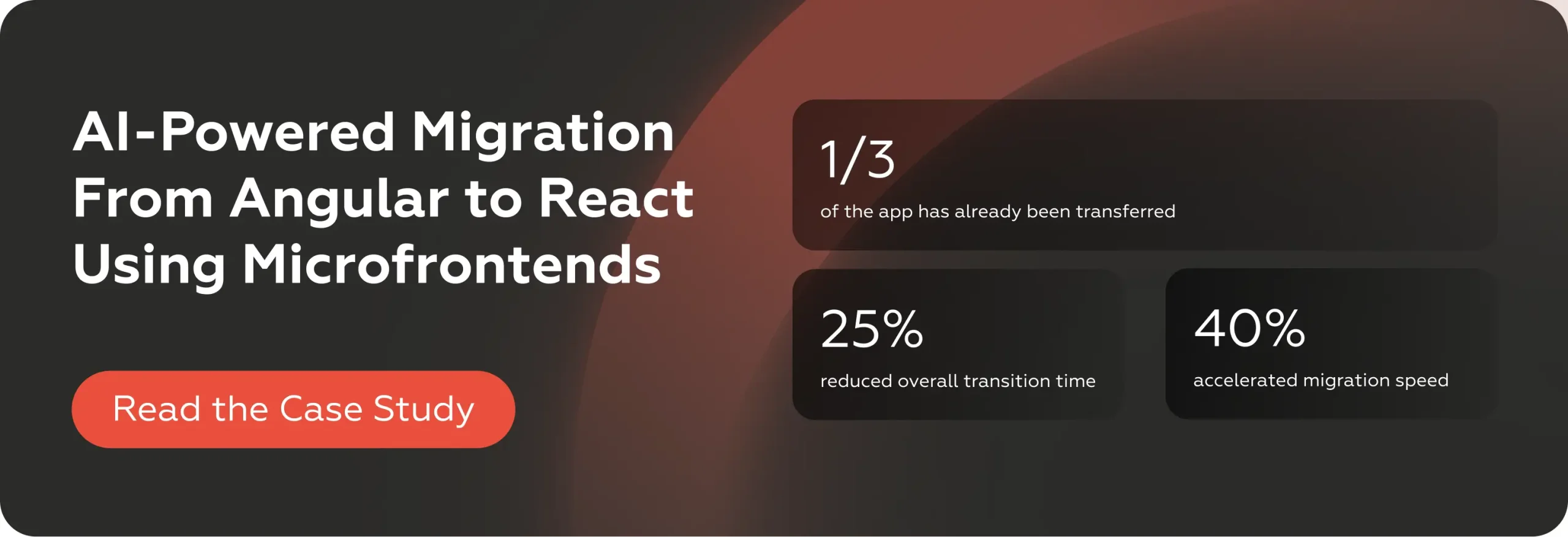
For organizations modernizing legacy systems, this is especially valuable. AI-assisted development tools can map dependencies in monolithic applications, recommend decomposition strategies for microservices migration, and predict the blast radius of architectural changes. Crunch-IS put this into practice during an AI-powered migration from Angular to React using microfrontends — where a custom GPT-4-powered tool accelerated component conversion and reduced manual translation errors across a complex enterprise codebase.
AI in Code Generation and Development
Code generation is where most teams first experience the AI software development lifecycle in action.
Intelligent code generation goes well beyond autocomplete. Modern AI coding agents can:
- generate entire functions from natural language descriptions;
- refactor existing code for performance or readability;
- translate code between languages and frameworks;
- produce documentation alongside the code itself;
- detect and resolve code smells in real time.
AI-generated code requires the same review rigor as human-written code. Code review, testing, and security scanning still apply.
AI in Testing and Quality Assurance
Traditional testing approaches struggle with coverage — manual test creation can’t keep pace with modern release cycles, and scripted tests become brittle as the codebase evolves.
AI flips the model. Machine learning algorithms analyze code changes, historical defect data, and runtime behavior to generate targeted test cases. They predict which areas of the codebase are most likely to break and prioritize test execution accordingly.
AI in Deployment and CI/CD Pipelines
AI automation in software development naturally extends to CI/CD. AI monitors pipeline health, predicts build failures before they happen, and automates rollback decisions based on real-time production signals.
Canary deployments benefit from AI that analyzes error rates, latency distributions, and business metrics to determine whether a release should proceed, pause, or roll back — faster and more consistently than manual monitoring. Feature flag management gets smarter as AI learns which user segments respond best to changes.
Elite-performing DevOps teams deploy 182 times more frequently than low performers, with 127 times faster lead times, according to multi-year DORA research. The compounding effect of AI across the delivery pipeline — smarter test selection, automated canary analysis, predictive failure detection — is what makes that gap achievable.
AI in Maintenance and Support
Post-deployment, AI shifts maintenance from reactive to predictive. Instead of waiting for user-reported bugs, AI monitors application behavior, identifies anomalies, and predicts failures before they impact users.
Log analysis — previously a manual trawl through millions of undifferentiated entries — becomes tractable when AI models can correlate patterns across distributed systems and surface root causes in seconds rather than hours.
AI also accelerates knowledge transfer. When a new team member needs to understand a legacy codebase, AI can generate documentation, explain complex functions in context, and map system dependencies — dramatically reducing onboarding time and the risk of knowledge walking out the door.
Step-by-Step Guide to Integrating AI into SDLC
Integrating AI into an existing SDLC doesn’t require a full rebuild. It requires a clear starting point, a measurable pilot, and a process for expanding what works. The six steps below move from audit to optimization — in the order that actually holds up in production.
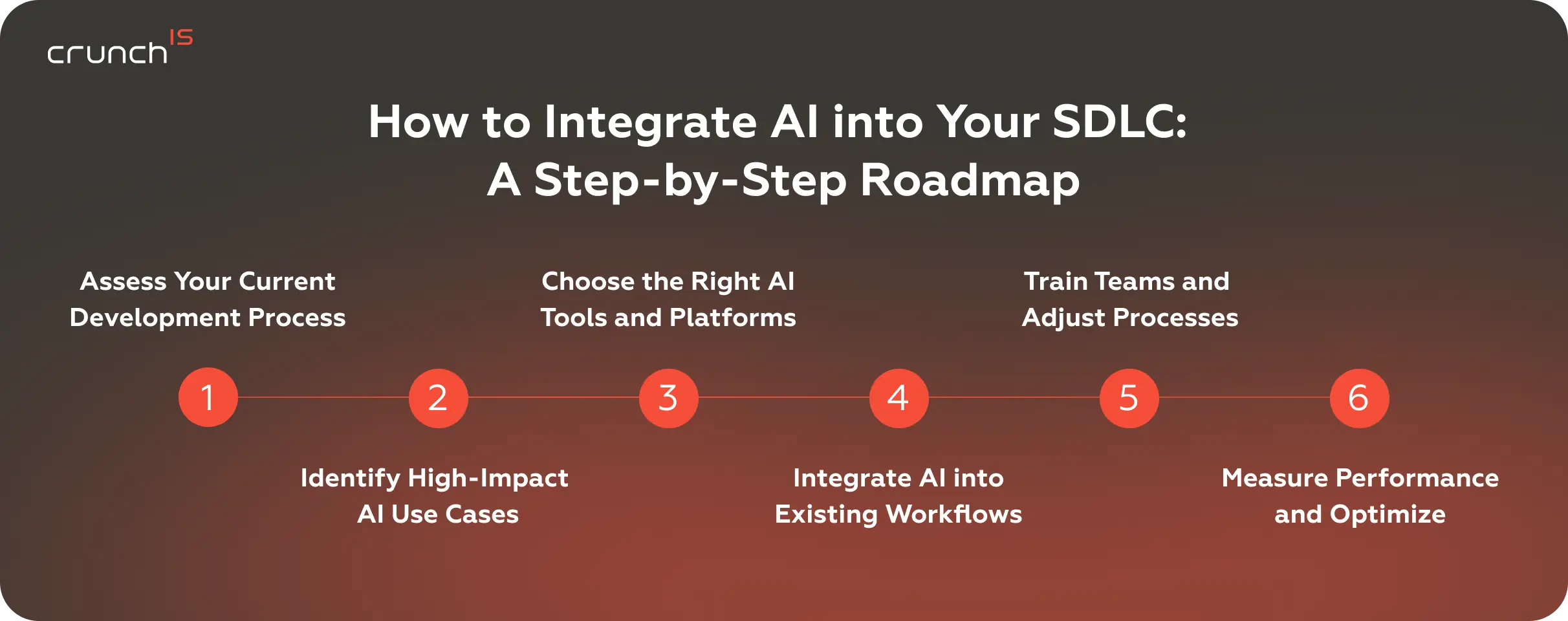
Step 1: Assess Your Current Development Process
Before deploying any AI tooling, map your existing SDLC end-to-end. Identify where your team spends the most time, where bottlenecks form, and where quality issues cluster. Talk to your engineers about their pain points.
Key questions to answer:
- Where do developers spend time on repetitive, low-judgment tasks?
- Which SDLC stages have the longest cycle times?
- Where do defects most frequently originate?
- What does your current toolchain look like, and where are the integration points?
It determines whether your first AI investment delivers visible results or sits unused.
Step 2: Identify High-Impact AI Use Cases
Not every SDLC phase benefits equally from AI — at least not initially. Start with high-volume, well-defined, and measurable use cases. Code review assistance, automated test generation, and CI pipeline optimization are common high-impact starting points because they deliver fast, visible results.
Avoid the trap of starting with the most technically ambitious use case. An AI-SDLC requirements analyzer might be transformative in theory, but if your team doesn’t have clean, structured data to feed it, the results will disappoint.
Step 3: Choose the Right AI Tools and Platforms
The AI tools for the software development landscape are evolving rapidly. Evaluation should focus on three dimensions:
- Integration depth.
Does the tool work within your existing IDE, CI/CD platform, and code review workflow? Or does it require developers to context-switch into a separate interface? - Customizability.
Can you fine-tune models on your codebase, coding standards, and domain-specific patterns? Generic models help, but custom-trained models deliver substantially better results. - Governance and security.
Where does your code go when the AI processes it? What data retention policies apply? For regulated industries it’s disqualifying.
Step 4: Integrate AI into Existing Workflows
Integration should feel like a natural extension. Embed AI into the tools your developers already use — IDEs, pull request workflows, CI pipelines, observability dashboards.
The integration should require no new habits — AI surfaces in tools that developers already open every day. A developer writes code and sees suggestions inline. A reviewer opens a PR and finds AI-flagged issues alongside human comments. A CI pipeline runs, and AI-prioritized tests execute first. No new tabs or dashboards.
Step 5: Train Teams and Adjust Processes
Technology adoption fails when human factors are ignored. Developers need to understand what AI can and can’t do, how to write effective prompts, and when to override AI suggestions.
Establish clear guidelines: when should developers rely on AI output, and when should they verify independently? How should AI-generated code be documented? What review standards apply?
Build internal champions — engineers who explore new capabilities, share what works, and help their teams improve. Organic adoption driven by peer credibility consistently outperforms top-down mandates.
Step 6: Measure Performance and Optimize
Define metrics before you deploy. Track:
- cycle time per stage (requirements to production),
- defect density in AI-enabled vs. traditional workflows,
- developer satisfaction and cognitive load,
- time saved on specific task categories, and
- cost per feature or story point.
Review these metrics monthly. Cut what isn’t moving the metrics. Expand what is. Treat AI-driven software development integration as a continuous process.
Engineering Intelligence at Scale: The Crunch-IS Approach
Crunch-IS AI-enabled engineering services start from the engineering problem, not the AI solution. We assess your current SDLC maturity, identify where AI creates the most leverage for your specific context, and implement it with the same rigor we bring to any production system — tested, monitored, and maintainable.
We assess your processes, configure AI tooling to your stack, and deliver. The Angular-to-React migration we completed for an enterprise IT services client wasn’t a proof of concept — 40% of a live production application now runs in React, migrated 40% faster than the baseline projection using a custom tool our engineers built on GitHub Copilot with a GPT-4 model for the engagement.
Best Practices for AI-Driven SDLC Integration
1. Start Small with Pilot Projects
The most successful AI-SDLC implementations start with a single team, a single phase, and a clearly defined success metric. Run a 30- to 60-day pilot comparing AI-enabled workflows against your baseline. Measure the impact, adjust, then expand.
Pilots protect you from two common failure modes: over-investing in a tool that doesn’t fit your workflow, and under-investing by spreading AI thinly across too many use cases before any one of them proves its value.
2. Ensure Data Quality and Availability
AI models are only as useful as the data they work with. Clean, well-structured code repositories, consistent commit messages, thorough issue tracking, and documented architecture decisions all improve the quality of AI output.
If your codebase has inconsistent naming conventions, sparse documentation, and fragmented test coverage, fix those fundamentals first. AI will amplify whatever it finds — including technical debt.
3. Align AI with Business Objectives
Every AI integration should trace back to a business outcome: faster time-to-market, lower defect rates, reduced operational costs, or improved developer retention. If you can’t articulate the business case for a specific AI use case, it’s probably not the right place to start.
It also gives you a concrete argument for budget and leadership buy-in. “We reduced our regression testing cycle from 8 hours to 90 minutes” resonates more than “we adopted cutting-edge AI technology.”
4. Maintain Human Oversight
Every AI output — generated code, test cases, architectural recommendations, deployment decisions — needs a human checkpoint calibrated to its risk level.
Low-risk outputs (code formatting suggestions, documentation drafts) can be accepted with light review. High-risk outputs (security-sensitive code, infrastructure changes, data migration scripts) require rigorous human verification. Calibrate your oversight model to match the stakes.
Future Trends: From AI-Augmented to Autonomous SDLC
The AI software development lifecycle is heading toward greater autonomy. AI agents that can interpret product requirements, write code, generate tests, review their own output, and iterate on failures are already demonstrating this capability in controlled environments.
Within three to five years, routine development tasks — CRUD operations, API integrations, standard UI components — will be largely automated. The engineering value will shift toward system design, business logic, and quality governance.
The developer’s job is changing, but not disappearing. The parts being automated are the ones most developers were happy to lose: boilerplate, syntax debugging, and manual test fixtures.
The developer role is evolving toward higher-order responsibilities: defining system behavior, evaluating trade-offs, and making judgment calls that require domain knowledge and business context. The developers who invest in learning to direct AI effectively, evaluate its output critically, and apply their uniquely human capabilities to the work that creates real value will be the most productive engineers in the years ahead.
Conclusion: Building a Scalable AI-Driven SDLC
Integrating AI in SDLC is an operational capability — built incrementally, measured rigorously, and refined as your team learns what actually works.
Start with your highest-friction SDLC stages. Pick tools that fit your workflow, not the other way around. Invest in your team’s ability to work alongside AI. Hold every AI initiative to the same standard you hold any engineering investment: does it make the system better?
The organizations moving fastest aren’t the ones with the most AI tools. They’re the ones who integrated deliberately, measured the results, and cut what didn’t hold up.
The AI-SDLC is already in production at organizations shipping faster and spending less. The decision your team faces is where you want to be when the gap becomes irreversible.