

Customers don’t want to wait on hold for answers they could find themselves. They want instant access to their data, their support history, and their account details — without picking up the phone. A well-built customer portal delivers exactly that. It also gives your business something more valuable: lower support costs, faster resolution cycles, and a structured channel for every client interaction that matters.
This guide covers what a customer portal is, which features drive adoption and reduce operational workload, how companies across different industries use them, and how to decide between building a custom solution and buying off-the-shelf.
- A customer portal reduces service team workload by enabling clients to access account data, submit requests, and resolve issues independently.
- Single Sign-On and role-based access control ensure that enterprise clients with dozens of users can authenticate once and access only the data relevant to their role.
- Workflow automation removes manual handoffs from approvals, onboarding, and notifications.
- Smart Search and AI assistants trained on product documentation and account-specific data resolve common questions in seconds rather than generating support tickets that take hours to close.
- For B2B environments with complex account hierarchies, deep system integrations, or regulated data handling, custom-built portals deliver long-term cost advantages.
Customer Portal Definition
A customer portal is a secure, web-based platform where clients can access account information, submit and track support requests, view documents, and interact with your team — all without having to route through a live agent. It centralizes what would otherwise be scattered across email threads, phone calls, and spreadsheets.
The key concept is centralization. A portal combines account management, knowledge bases, communication history, and service status into one authenticated environment. For a B2B customer portal in particular, this means account-level visibility: contract terms, invoices, project milestones, and escalation paths — all accessible to the people who need them, at the time they need them.
A portal is distinct from a public help center. Help centers are open to anyone. A portal is gated, personalized, and connected to the specific data and workflows relevant to each client account. That distinction matters both for security and for the quality of the experience.
Key Features of a Customer Portal
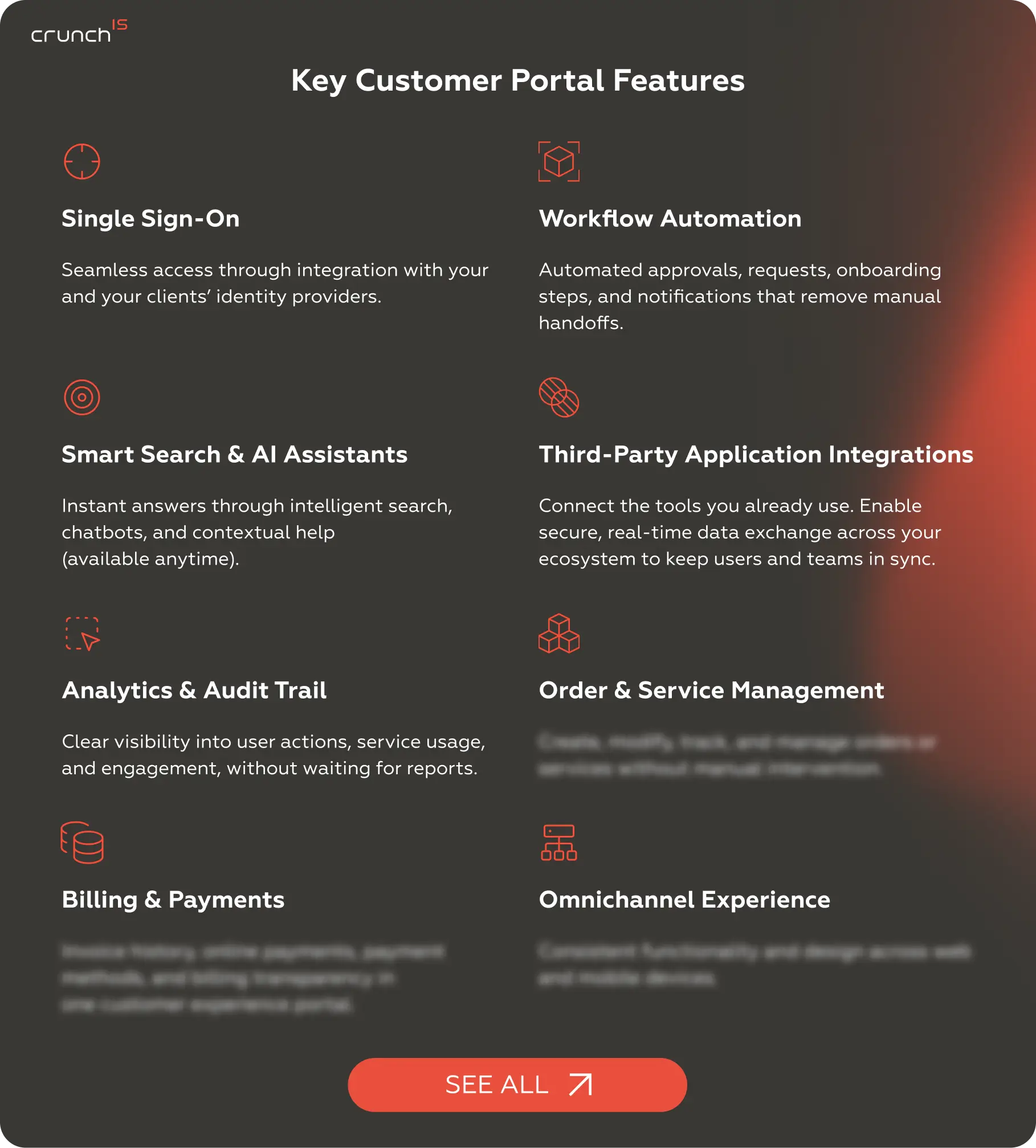
The features listed below are most often found in portals that are actually used. They address the operational problems clients run into daily — access friction, slow approvals, fragmented data — and the visibility gaps that slow down your internal team. We’ve highlighted five here. For the broader capability set, see the Customer Portal Development service page.
Single Sign-On
Access friction kills adoption before a portal ever proves its value. Single Sign-On removes that friction by integrating with your and your clients’ existing identity providers — so users authenticate once and move through the portal without re-entering credentials or managing a separate login.
For B2B customer portal environments, this matters beyond convenience. Enterprise clients often have dozens of users accessing the same account, each with different permissions. SSO connects those users to the right role-based access controls without requiring your team to manage it manually. The right information appears for the right person — procurement sees contracts and invoices, technical leads see service records and tickets, executives see account summaries. All from one login.
On the security side, SSO reduces the attack surface. Fewer credential sets in circulation means fewer points of exposure. In regulated industries — financial services, healthcare, energy — this is as much a compliance argument as a usability one. Integrations with established identity providers (Okta, Azure AD, Google Workspace) make implementation straightforward rather than a custom build from scratch.
Workflow Automation
Manual handoffs are where service requests go to stall:
- an approval sits in someone’s inbox,
- a notification doesn’t fire,
- an onboarding step gets missed because it depends on a human remembering to trigger it.
Workflow Automation replaces those gaps with rules-based logic — approvals route automatically, onboarding steps progress on schedule, and notifications reach the right people without anyone managing the queue by hand.
The operational effect is direct. Every manual step automation removes reduces response time and headcount-hours spent on process overhead. For companies handling high volumes of recurring request types — access provisioning, contract renewals, service activations — this is where the most immediate support costs savings appear.
For SaaS businesses specifically, automated onboarding workflows also accelerate time-to-value for new accounts. When setup steps that previously required coordination between your team and the client run automatically — environment provisioning, welcome sequences, access grants — new clients reach productive use faster. That compresses the gap between contract signature and first meaningful outcome.
Smart Search & AI Assistants
A portal without an effective search is a portal clients abandon. Smart Search & AI Assistants surface relevant answers from your knowledge bases, documentation, and account data in real time — so clients get an answer immediately rather than submitting a ticket and waiting. The difference between a client resolving an issue in 30 seconds and a support ticket taking 2 hours to close is often just the quality of the search layer.
This is where AI agents add the most concentrated value. Conversational assistants trained on your product documentation and account-specific data handle common questions — feature clarifications, account status, billing inquiries — without involving your support team. The more specific the training data, the higher the resolution rate without escalation. And the higher the resolution rate, the lower the per-contact cost.
Third-Party Application Integrations
A portal that doesn’t connect to your existing systems creates more work. Third-Party Application Integrations determine whether a portal becomes a genuine operational hub or a parallel system that your team has to reconcile manually. When portal data flows automatically into your CRM, billing platform, ERP, and ticketing system, every client interaction in the portal becomes visible to the internal team without anyone having to copy records between tools.
For your clients, integrated data means real-time accuracy. Account status, order history, service records — all current, because they’re pulling from the same source of truth as your back-end systems. For your team, it means that when a support request arrives, the agent opens it with full account context already visible: contract tier, recent interactions, outstanding invoices, and open tickets. That context collapses resolution time and improves response quality.
For a customer self-service portal built for B2B environments, the integration layer is particularly critical. Enterprise clients often have their own procurement, billing, and project management systems that need to stay synchronized with yours. Bidirectional data flows are what make that work without manual intervention on either side. The integrations layer is also where long-term extensibility lives: as your tech stack evolves, a well-architected integration approach adapts without requiring a portal rebuild.
Analytics & Audit Trail
Most portals generate data. Few make that data visible in a way that’s actually useful. The Analytics & Audit Trail feature does both: it gives your team real-time visibility into user actions, service usage, and engagement patterns — without waiting for scheduled reports — and it creates a logged record of every interaction in the portal.
The operational use cases for real-time analytics are immediate. You can see which support requests are most frequent — and use that to improve your knowledge bases or automated workflows to resolve them before they become tickets. You can identify which features clients engage with and which they ignore — and use that to prioritize the roadmap. You can spot accounts that haven’t logged in recently — and use that as an early churn signal for account management to act on before renewal.
Benefits of a Customer Portal for Businesses and Customers
A customer portal changes the economics of the client relationship on both sides:
- businesses carry less operational weight;
- customers get faster, more reliable access.
The benefits compound each other. When clients resolve issues themselves, your team handles less volume. When your team handles less volume, response quality improves for the work that remains. Below is the breakdown.
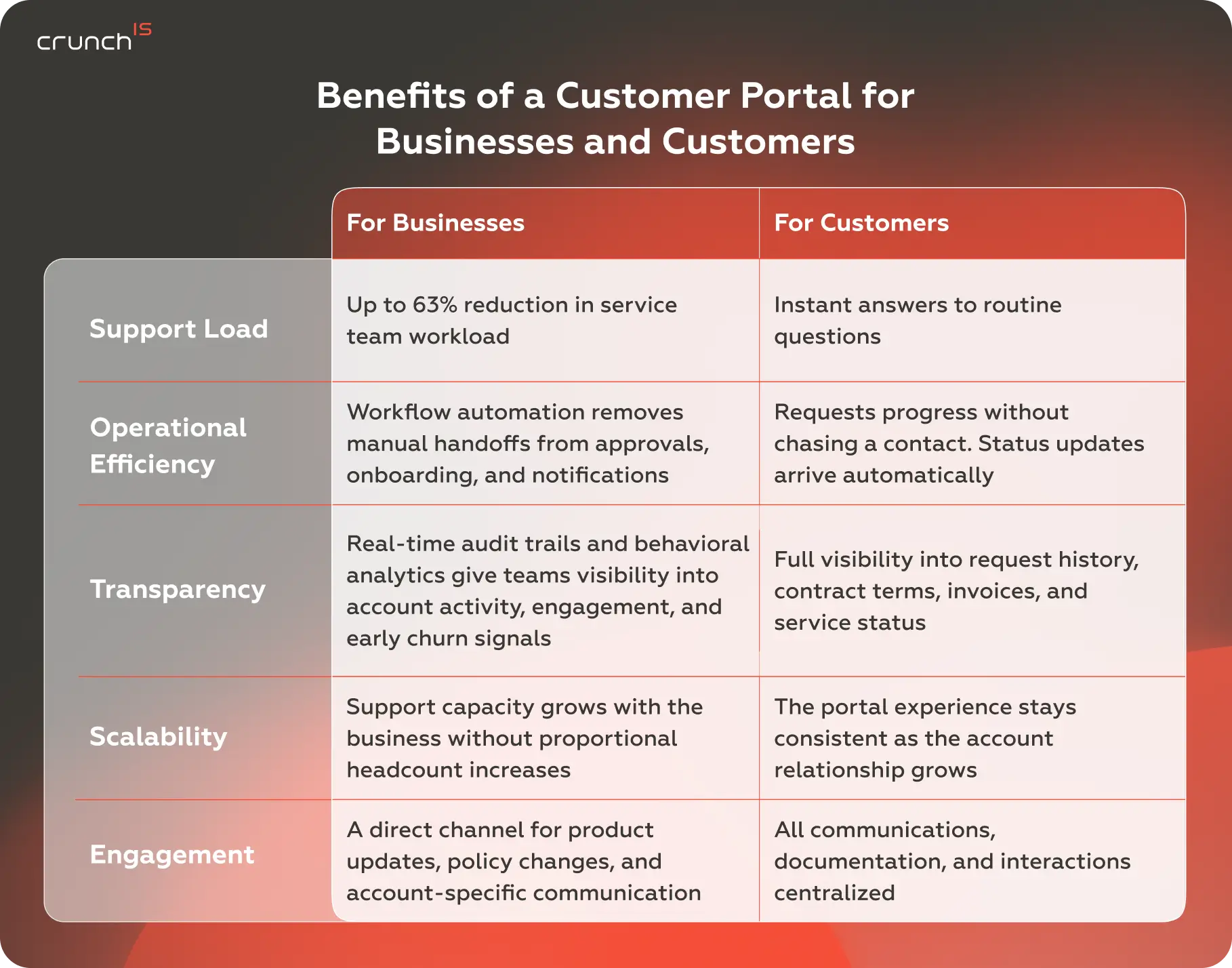
The IT infrastructure portal Crunch-IS built for a UK enterprise client achieved a 30–50% self-service success rate — meaning nearly half of all customer interactions were resolved through the portal without agent involvement.
How Customer Portals Are Used in Different Industries
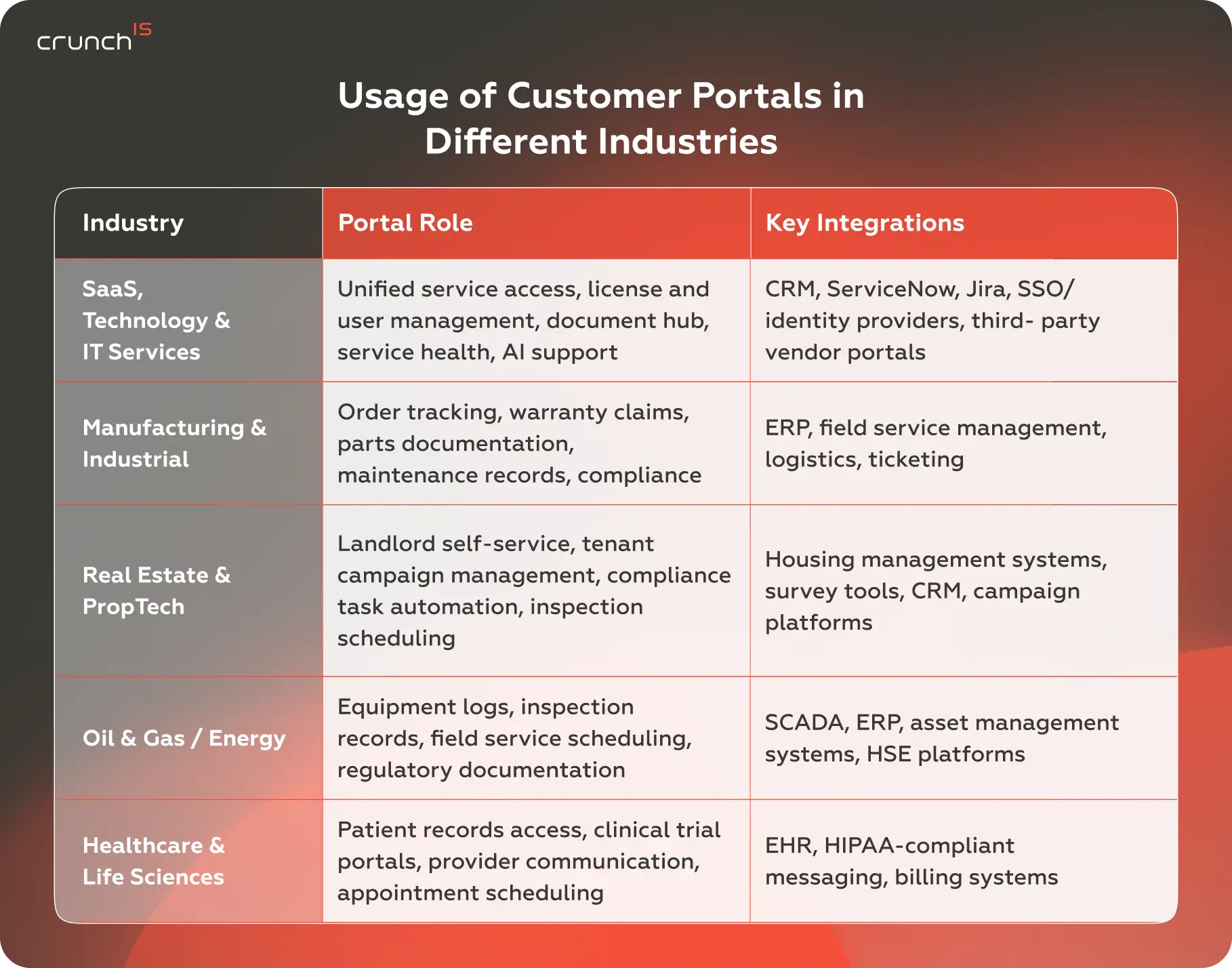
The customer self-service portal varies by industry. The underlying need — reduce friction, increase access — is constant. The execution varies significantly based on data sensitivity, regulatory requirements, and the complexity of the account relationship.
SaaS, Technology & IT Services
In this category, clients are already digital natives — they expect self-service and notice when it’s missing. The portal needs to consolidate access to multiple products, vendor tools, and support channels into a single place: service health, license management, document storage, user administration, and account reporting, all under a single login. SSO handles access. Integrations with ticketing and CRM systems give both clients and internal teams a shared, accurate view of every account.
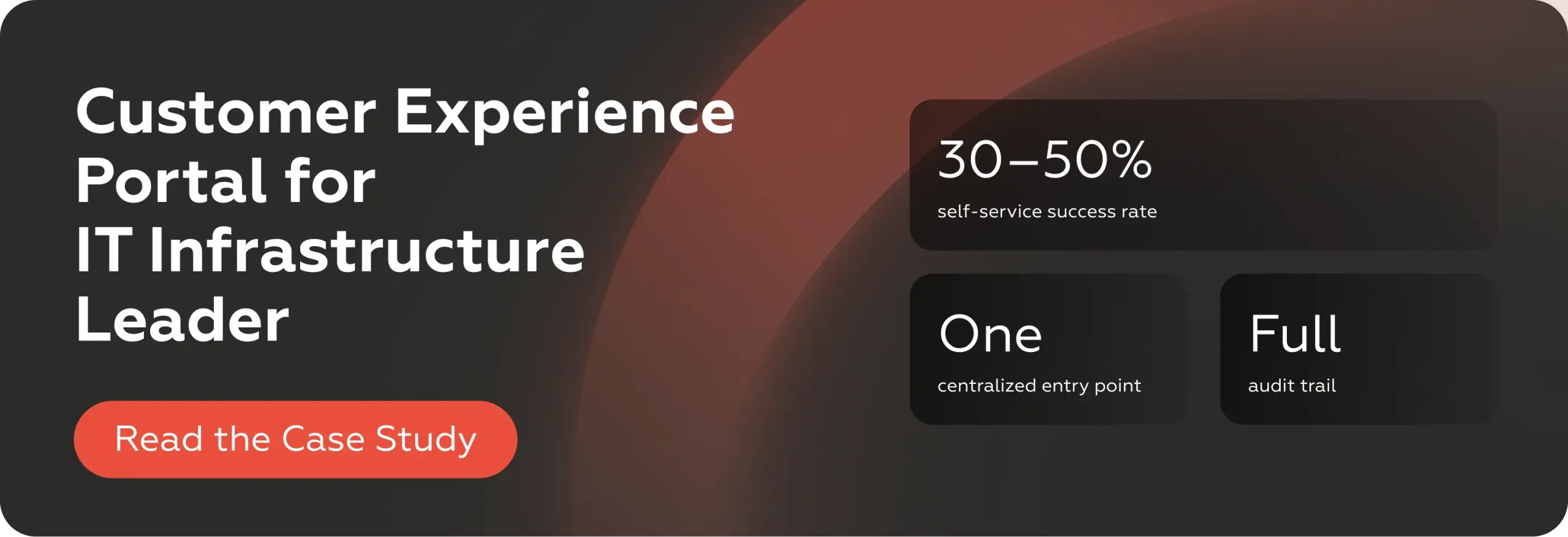
Crunch-IS built a customer experience portal for a UK IT infrastructure services provider — consolidating service access, document management, real-time support, and reporting across ten internal departments into one entry point, with a 30–50% self-service success rate.
See what a part of this project (UX redesign across four enterprise platforms) looks like from the client side.
Manufacturing & Industrial
B2B manufacturers typically handle high volumes of transactional client interactions, including order tracking, warranty claims, spare parts requests, and technical documentation. Without a portal, these routes go through email and phone — slow, hard to scale, and difficult to audit.
A portal centralizes the full account relationship: clients track orders and service requests in real time, access product documentation, and manage warranty and compliance records without involving a coordinator. For manufacturers serving large enterprise accounts across multiple sites, this turns a phone-intensive process into a structured, self-managed layer.
Real Estate & PropTech
Property management, residential platforms, and housing software all share the same core problem: a high volume of recurring, transactional interactions between operators and a large, distributed user base — tenants, landlords, agents, or local authorities. Portals handle the workload that would otherwise sit in email inboxes and call queues:
- maintenance requests,
- lease documentation,
- inspection scheduling,
- payment records,
- compliance tracking.
The self-service layer matters here because the interactions are frequent and often time-sensitive, but individually low-complexity. Automating routine tasks — status updates, deadline reminders, document access — frees operational teams to focus on cases that genuinely require human judgment.
Crunch-IS built a self-service portal for a UK social housing software provider, replacing manual campaign coordination with automated task triggers, landlord self-service configuration, and a centralized operational dashboard — enabling the organization to manage higher interaction volumes without expanding the support team.

Oil & Gas / Energy
In asset-heavy industries, the portal connects operational data with account management — giving clients and field teams access to equipment maintenance logs, inspection records, field service schedules, and regulatory documentation without routing through a coordinator. The compliance layer is critical: regulatory documentation has to be current, accessible, and auditable at all times.
For operators managing assets across multiple sites, a portal that surfaces the right records for the right asset at the right time reduces both administrative overhead and compliance risk.
Healthcare & Life Sciences
Security and regulatory compliance define the architecture from the start. Patient portals, provider communication tools, and clinical trial access platforms all operate under strict data-handling requirements: HIPAA in the US and equivalent frameworks in other markets. Role-based access, encrypted communication, and full audit trails are structural requirements. The portal also has a direct impact on care, giving patients and providers access to records, test results, and scheduling, reducing administrative friction on both sides and supporting continuity of care.
How to Create a Customer Portal
Deciding to build a portal is the easy part. Defining what it needs to do — and choosing the right approach to create it — is where the real decisions happen. Getting this right determines whether the portal drives adoption or sits underused.
Essential Factors to Consider
Before choosing a platform or starting development, define the portal’s job. Specificity here determines whether the investment pays off.
Define the use case clearly. What are the five most common reasons clients call or email your team? Those are the first five things your portal should handle. Start with the highest-volume, lowest-complexity queries — they offer the best ROI and the fastest path to visible impact.
Map your integrations. A portal that doesn’t connect to your CRM, billing system, and ticketing infrastructure quickly becomes a dead end. List every system your team uses to manage client data. Any solution — custom or ready-made — needs a realistic integration path before you commit to it.
Plan access control upfront. Who uses the portal? Define user personas. A legal contact at an enterprise client needs different access than a day-to-day technical user. Designing access control before you build prevents expensive re-architecture after launch. This is especially critical for B2B customer portal implementations where multi-user, multi-permission account structures are the norm.
Consider the data model. If your client relationships are account-based — multiple users per company, tiered permissions, shared document access — you need a portal architecture that reflects that. Most off-the-shelf tools are optimized for simpler, individual-user models and struggle with enterprise B2B account structures.
Decide on AI early. Whether you’re embedding a knowledge base search, an AI-powered chatbot, or a more sophisticated AI agents layer, these decisions affect architecture from the start. Retrofitting AI onto a portal not designed for it is significantly harder — and more expensive — than planning for it from day one.
Think about scalability. A portal that handles 50 accounts well but breaks at 500 is a short-term fix. Define your scale assumptions early and verify that your chosen platform or architecture can meet them.
Custom Development vs Ready-Made Solutions
The choice isn’t binary — it’s a tradeoff between speed, control, and long-term cost. The right answer depends on the complexity of your use case and how central the portal is to your client relationship.
The central question: does your process fit the tool, or does the tool need to fit your process?
Ready-made customer portal software
Off-the-shelf platforms — CRM-embedded portals, standalone SaaS tools, or modular help desk platforms — offer fast deployment, a defined feature set, and predictable licensing costs. They work well for companies with standard use cases: basic ticketing, document sharing, and a searchable knowledge base.
The limitations emerge at scale or specialization. Most ready-made tools offer limited flexibility in data modeling, integration depth, and UI customization. When your workflow doesn’t fit the tool, you adapt your workflow — or accumulate workarounds that become technical debt.
For simple, low-complexity use cases, that’s an acceptable tradeoff. For companies where the portal is a core client-facing product, it’s not.
For B2B customer portal requirements — such as complex account hierarchies, deep system integrations, custom workflows, or regulated data handling — off-the-shelf tools often fall short of what’s actually needed.
Custom development
Custom-built portals start from your specific requirements:
- the data model reflects your business logic;
- integrations connect to the systems you actually use;
- access control matches your account structure;
- the UI aligns with your brand and workflow.
The tradeoff is time and investment. A custom portal takes longer to build and requires the right development team. But for companies where the portal is the primary interface for enterprise clients, the long-term cost-benefit balance decisively shifts toward custom. You own the codebase, you control the roadmap, and you don’t pay per seat indefinitely.
The decision comes down to two questions:
- Does your use case fit within the constraints of an available platform, or does it require logic that off-the-shelf tools can’t support?
- Is the portal a differentiating part of your product, or a utility?
If the answer to either question points toward complexity or differentiation, custom development is the correct path — and investing in it early avoids a more costly rebuild later.
Crunch-IS builds custom software for companies at exactly this decision point — from initial scoping and architecture through to deployment and post-launch support. Our services span end-to-end development, system integration, UI/UX design, and AI/ML implementation for clients in IT, real estate, healthcare, manufacturing, energy, and other sectors. If you’re evaluating your options, contact our team to scope your specific requirements.
Closing Thoughts
A customer portal is an operational investment that affects support costs, client retention, and the daily experience of every account you manage. Getting it right means starting with clear requirements — and, if the use case demands it, building rather than fitting your business into an off-the-shelf box.
The companies that treat portals as a strategic asset are the ones that see measurable returns: lower ticket volume, faster procurement cycles, higher renewal rates, and a client experience that holds up under scrutiny.