

Computer vision is increasingly being implemented across work processes of various industries. However, the development and implementation of AI-powered computer vision systems can be costly. While model development has become more accessible thanks to pre-trained architectures and open-source libraries, the real cost challenge often lies in deployment. Decisions about hosting, inference, storage, and infrastructure can significantly impact your long-term ROI.
In this article, we will examine how various deployment strategies (cloud-based, on-edge, and embedded) impact both cost and performance. You’ll learn where costs come from, which architecture fits your use case, and how to make smarter decisions that keep your computer vision budget in check.
- Deployment architecture is the dominant cost driver in computer vision, with hosting, inference, data transfer, and maintenance accounting for the long-term ROI.
- Cloud-based computer vision offers unmatched scalability and rapid iteration, but uncontrolled GPU usage, continuous video streaming, and storage growth can quickly inflate operational costs.
- Edge deployment shifts costs from recurring cloud spend to upfront hardware investment, delivering lower latency, better privacy, and predictable long-term expenses for real-time use cases.
- Embedded computer vision achieves the lowest per-unit cost at scale by running highly optimized models on ultra-low-power hardware (but only supports narrow, task-specific workloads).
- Hybrid architectures increasingly outperform single-mode deployments by keeping real-time inference on edge or embedded devices while centralizing training, analytics, and monitoring in the cloud.
- Meaningful cost reduction comes from aligning latency, privacy, and performance requirements with the simplest viable deployment model.
What Drives the Cost of Computer Vision?
At a high level, the total cost of building and running a computer vision comes from four key areas: development, data, infrastructure, and long-term maintenance.
- The development process encompasses creating bespoke code, training models, and seamlessly integrating CV into existing systems.
- Data costs result from the collection and labeling of visual datasets, particularly when accuracy demands custom, domain-specific data.
- Infrastructure encompasses the necessary computing capabilities and storage capacity required to train and deploy models, whether in the cloud or on-device.
- Maintenance includes ongoing updates, monitoring, MLOps workflows, and ensuring the team has the capacity to support the system over the long term.
Each of these components scales differently depending on how and where you deploy your models, especially when deciding between edge devices and cloud-based inference.
For a full breakdown of each cost category, check out our in-depth guide: The 2025 Guide to Computer Vision Development: Costs, Process & Tech Stack
How to Choose the Right Computer Vision Deployment Approach: Cloud, Edge, or Embedded?
When deploying computer vision, the architecture you choose (cloud, edge, or embedded) can significantly affect performance, scalability, and cost structure.
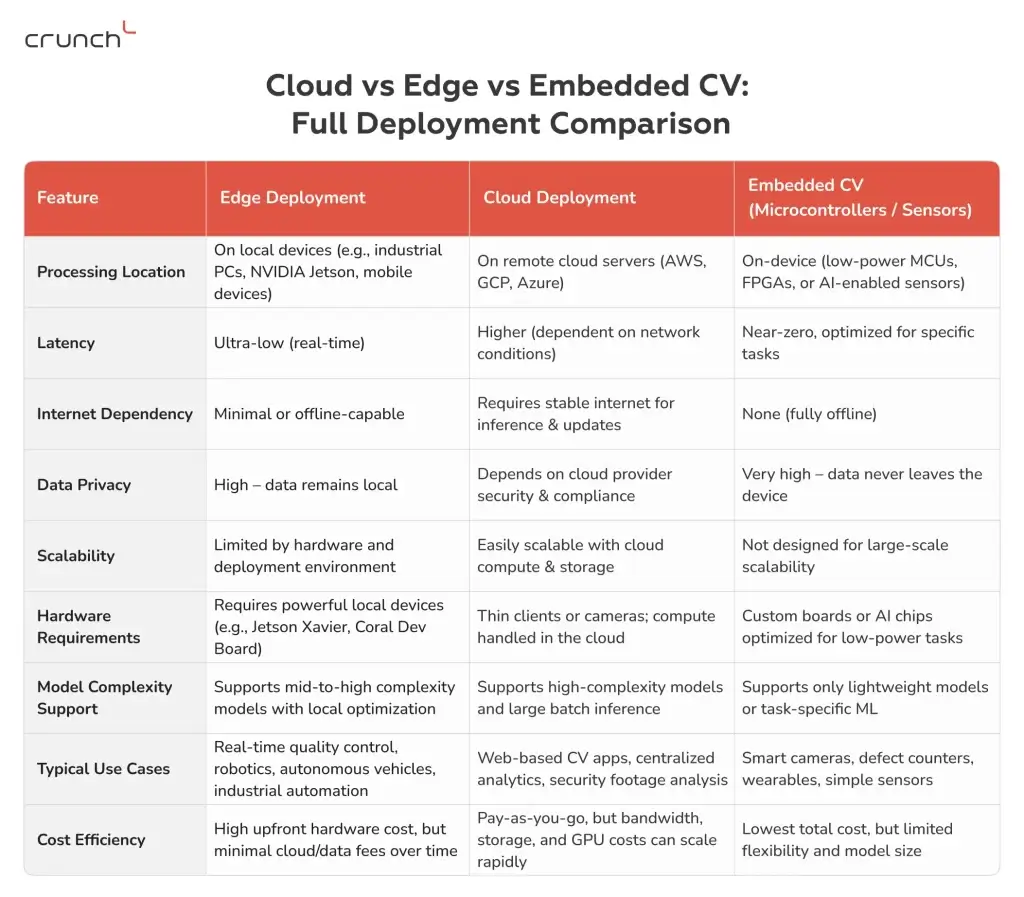
Cloud-based computer vision is often the go-to for companies looking for scalability and ease of integration. You can train and deploy high-complexity models, tap into virtually unlimited storage and compute, and access managed services. However, these benefits come at a price: pay-as-you-go billing models can scale rapidly as data grows, particularly for continuous video streaming, GPU inference time, and storage.
Edge deployment, on the other hand, involves running models directly on local devices. While the initial hardware cost is significant, it is a long-term investment that pays off due to its low latency and minimal ongoing data transmission fees. This architecture is well-suited for real-time CV applications, such as quality control on a production line or autonomous navigation.
Embedded computer vision (often running on microcontrollers or specialized AI chips) is the most cost-efficient in the long run. These systems are built for specific tasks with strict constraints on power, memory, and model size. While they’re not suitable for complex workloads, they’re ideal for simple, high-volume, low-cost tasks, such as object counting, basic defect detection, or barcode scanning. There are no cloud fees, no connectivity dependency, and near-zero latency.
Each approach offers trade-offs among flexibility, performance, and cost efficiency. That’s why many modern systems use a hybrid architecture, where lightweight tasks are handled at the edge or on embedded devices, while heavy training and analytics occur in the cloud.
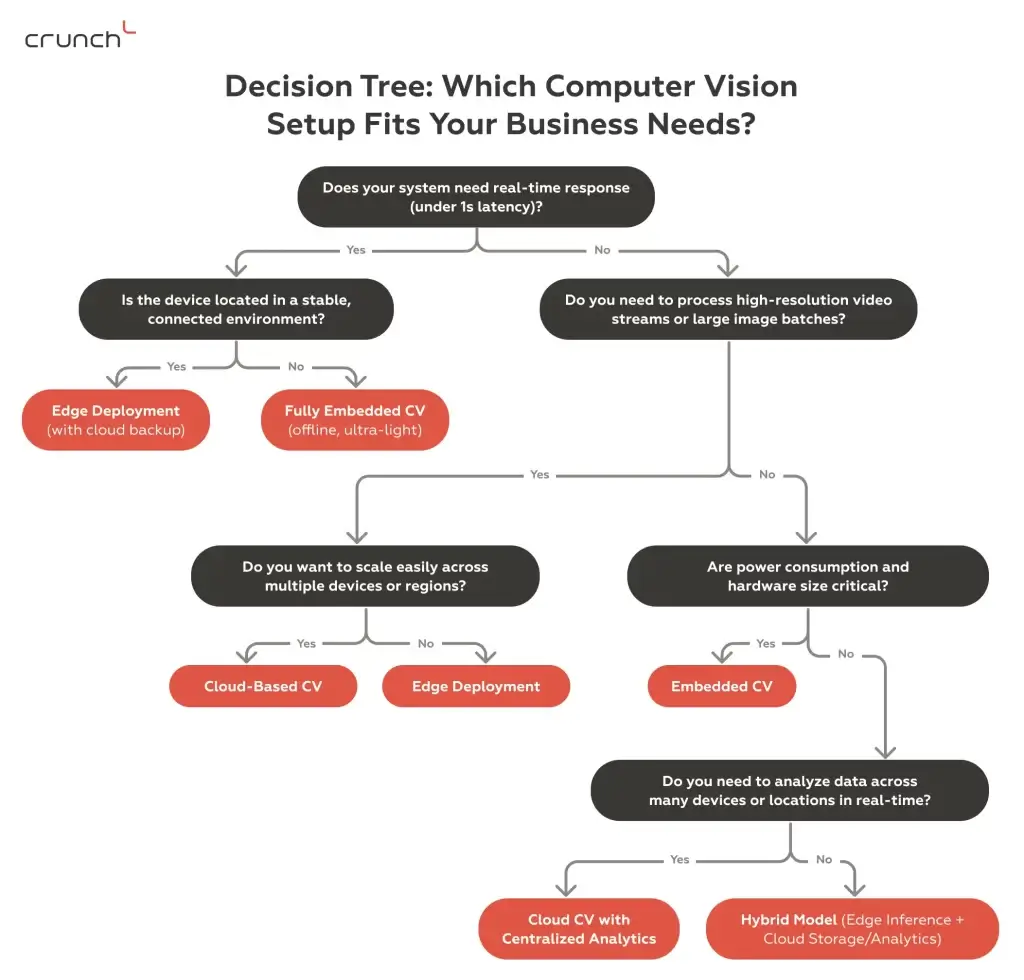
Use this flowchart to determine the most suitable deployment architecture (cloud, edge, or embedded) based on latency, power, privacy, scale, and use case constraints.
Cloud-Based Computer Vision: AWS, GCP, Azure
Cloud-based computer vision deployment refers to running your AI models, such as image recognition, object detection, or video analysis, on remote cloud servers instead of local devices. In this setup, visual data is sent to the cloud, where powerful GPUs or TPUs process the data and return insights, predictions, or alerts.
Below is a breakdown of how computer vision systems are commonly deployed using top cloud platforms like Amazon Web Services (AWS), Google Cloud Platform (GCP), and Microsoft Azure:
AWS for Computer Vision Deployment
Custom models are usually trained using GPU-powered EC2 instances or Amazon SageMaker, then deployed as scalable endpoints via SageMaker or containerized with ECS/EKS. Model artifacts and datasets are stored in S3. For real-time image or video streams, Rekognition or Kinesis can be used in hybrid setups alongside your own models.
Google Cloud for Computer Vision Applications
Using Vertex AI, developers can train, fine-tune, and deploy computer vision models with fully managed infrastructure. Models are served via endpoints and integrated into applications using REST APIs. Google Cloud Storage is commonly used for storing image datasets. CV models can also be paired with prebuilt tools, such as the Cloud Vision API, when only partial customization is needed.
Azure for Custom Vision Workloads
Azure supports deploying custom computer vision models using Azure Machine Learning and Kubernetes Service. Models are trained either in Jupyter-based ML Studio or in Docker containers, and are stored in Blob Storage. Inference can happen in the cloud or on edge devices using Azure IoT Edge and ONNX Runtime.
Choosing the right cloud depends on your project’s latency requirements, budget, and deployment strategy (centralized vs edge).
Cloud-based computer vision offers several key advantages. First, its strong scalability enables you to process large datasets and serve many users with ease. Secondly, it supports instant updates, allowing models and features to be rolled out without hardware changes. And also, remote access makes it ideal for global teams, and seamless integration with other cloud tools boosts overall automation efficiency.
If you want to discover how we achieved over 95% person detection and 98% face recognition accuracy with a cloud-based computer vision project, please refer to our complete success story.
Cost Optimization Tips for Cloud-Based Computer Vision
While cloud CV offers significant flexibility, it can also incur substantial costs if not properly optimized. Find below some recommendations to improve cost-efficiency:
1. Use Spot Instances or Preemptible VMs
Platforms like AWS and GCP offer deeply discounted compute for non-critical jobs such as model training or batch processing.
2. Pre-process Data on the Client Side
Crop, resize, or compress images before uploading to reduce data transfer costs and storage usage.
3. Use Serverless & On-Demand Inference
Instead of running GPUs 24/7, use serverless endpoints (like AWS Lambda or Vertex AI’s prediction service) that activate only when needed.
4. Archive Old Data
Shift infrequently used image/video files to cold storage to save long-term costs.
What Is On-Edge Computer Vision Deployment?
Edge deployment places the computer vision model directly on local devices such as cameras, industrial robots, drones, or IoT units. Instead of sending visual data to a centralized server, inference is performed in real-time (right at the source).
This approach is especially valuable when ultra-low latency, limited connectivity, or data privacy is critical. Use cases such as autonomous vehicles, industrial safety monitoring, and mobile robotics often can’t afford to wait for cloud responses.
Edge-based computer vision is the ideal choice when:
- Real-time decision-making is required (stopping a machine immediately when a defect is detected)
- Connectivity is unreliable or expensive (in remote factories, oil rigs, or farming fields)
- Data privacy regulations limit cloud usage (healthcare or defense settings)
Despite its long-term benefits, getting started with edge computer vision involves a few upfront challenges:
1) Specialized hardware. Running AI models locally requires compact yet powerful devices such as NVIDIA Jetson Nano/Xavier or Google Coral Edge TPU. These edge accelerators offer GPU-like performance in small form factors, but the hardware itself adds to your bill, especially when scaling to hundreds or thousands of units.
2) Model optimization overhead. Not all CV models can run efficiently on edge hardware out of the box. To meet memory, power, and latency constraints, developers often need to quantize models, prune unnecessary layers or neurons, and convert to formats such as TensorRT, ONNX, or TFLite.
Cost Optimization Tips for Edge Computer Vision
To reduce the total cost of ownership for edge-based CV systems, focus on smart trade-offs between performance, power, and functionality:
Use Lightweight Models
To optimize efficiency and reduce computing demands, consider deploying efficient architectures such as MobileNet or YOLO-Nano, which can run on more affordable edge devices.
Apply Model Optimization Techniques
It is possible to achieve a significant reduction in model size and power consumption while addressing accuracy trade-offs by using techniques such as quantization and pruning.
Choose the Right Hardware Tier
It is essential to match hardware to your actual performance needs. It is advisable to consider whether investing in more powerful devices is necessary, as smaller boards such as the Jetson Nano or Coral may suffice for the task at hand.
Limit On-Device Functionality
Keep only critical inference tasks on the device. Offload non-essential workloads (e.g., logging, reporting) to reduce memory and processing requirements.
What Is Embedded Computer Vision Deployment?
Embedded computer vision is the most resource-efficient way to run visual intelligence, performing inference directly on microcontrollers or ultra-low-power chips embedded in devices such as smart locks, barcode scanners, and motion-activated security cameras.
This approach differs from the conventional implementation of edge computing. This is a technology that allows machine learning models to be compressed and optimized for devices with limited RAM and computing power (TinyML).
Computer vision embedded systems are ideal for the following situations:
- Power consumption must be kept to an absolute minimum.
- These devices are designed to operate in either offline or remote settings.
- Only basic visual analysis is required, such as identifying a simple shape or pattern.
- Real-time cloud communication isn’t viable or necessary
But an embedded CV isn’t suited for every use case. It trades depth for efficiency:
- Cannot run large or deep neural networks
- Limited to simple classification or rule-based vision tasks
- Struggles with variability in lighting, motion blur, or complex backgrounds
- Requires heavily optimized models, often using formats like TFLite Micro or CMSIS-NN
In short, embedded vision is well-suited for applications that require minimal intelligence at scale, with low cost and energy consumption.
Cost Optimization Tips for Embedded Computer Vision
To make embedded computer vision solutions cost-effective and sustainable, it’s crucial to optimize every element:
Leverage TinyML Frameworks
To run ultra-light models on minimal hardware, use optimized frameworks such as TensorFlow Lite for Microcontrollers or Edge Impulse.
Design for a Single-Purpose Task
To optimize efficiency and minimize resource consumption, it is essential to maintain a narrowly focused vision task, such as barcode reading or shape detection. This approach simplifies the model, reduces memory requirements, and lowers power consumption.
Choose Ultra-Low-Power Hardware
Select MCUs with built-in vision support that offer sufficient computing power for inference while maintaining minimal energy consumption.
Optimize Data Flow and Storage
It is important to avoid excessive buffering or logging. Please note that images are processed in-stream and only key metadata or events are stored. This will help to save memory and extend the device’s lifespan.
What Type of Computer Vision Deployment Should You Choose in 2025?
In 2025, hybrid architectures are gaining significant traction by blending the real-time responsiveness of edge computing with the power and scalability of cloud infrastructure.
Modern CV solutions increasingly favor hybrid deployment models:
- Inference is performed at the edge (smart cameras, industrial robots) to ensure ultra-low latency.
- Data is securely transmitted to the cloud for centralized storage, retraining, analytics, and dashboarding.
This combination offers the best of both worlds: fast, local decisions and strategic long-term insights, while reducing cloud costs for bandwidth-intensive workloads such as video streams.
What Type of Computer Vision Architecture Suits Your Business Best?
- Cloud-Based CV is ideal for businesses handling large datasets, running complex analytics, or needing to scale fast across geographies. It’s often chosen by enterprise SaaS platforms, retail analytics providers, and multi-site manufacturers.
- Edge CV is well-suited to industries that require real-time decision-making and high privacy, such as automotive, healthcare devices, and smart factories. It works best when there’s on-site infrastructure (power and compute), but when internet connectivity is intermittent or latency cannot be tolerated.
- Embedded CV is well-suited for niche, ultra-low-power applications such as smart locks, barcode readers, wearables, and IoT sensors. It suits companies that need basic visual recognition in remote or constrained environments without relying on the cloud.
Please note that there is no obligation to select only one option. Many of today’s most effective solutions incorporate a combination of deployment methods.
Still unsure which setup is right for your use case?
Our engineers can help you assess your needs and recommend the most cost-effective deployment strategy. Book a free consultation to get expert guidance on building scalable, efficient artificial intelligence vision systems.
Conclusion
In computer vision development, deployment architecture is a strategic lever. Choosing between cloud, edge, and embedded deployment can have a greater long-term impact on cost than model complexity or feature count.
By aligning your CV system’s latency requirements, privacy requirements, and compute constraints with the right setup, you can significantly reduce infrastructure costs without sacrificing performance or scalability.